
Y999 Game Withdrawal Failed – Easy Ways to Fix Payment Issues

Have you ever tried to withdraw money from Y999 Game but the payment did not reach your account? This can be frustrating, especially when you are waiting for funds in your EasyPaisa or JazzCash wallet. Sometimes, payments may take longer than expected because of service delays, incorrect details, or transaction verification.
If you are facing a Y999 Game Withdrawal Failed problem, the platform's No Wallet option may provide another way to manage payments. This feature uses a separate wallet system where users can buy and sell balance through available payment methods.

In this guide, you will learn how the No Wallet system works, how to register, and how to complete buying and selling orders. We will also explain possible payment issues, reward conditions, and important safety tips.

Y999 Game Withdrawal Failed – Easy Ways to Fix Payment Issues

Have you ever tried to withdraw money from Y999 Game but the payment did not reach your account? This can be frustrating, especially when you are waiting for funds in your EasyPaisa or JazzCash wallet. Sometimes, payments may take longer than expected because of service delays, incorrect details, or transaction verification.

Y999 Game Withdrawal Failed

If you are facing a Y999 Game Withdrawal Failed problem, the platform's No Wallet option may provide another way to manage payments. This feature uses a separate wallet system where users can buy and sell balance through available payment methods.

In this guide, you will learn how the No Wallet system works, How to Register, and how to complete buying and selling orders. We will also explain possible payment issues, reward conditions, and important safety tips.

Why Does Y999 Game Withdrawal Failed Error Occur?

There can be different reasons behind a failed or delayed payment. Before trying another transaction, it is helpful to understand what might be causing the problem.

Here are some common reasons:

If your Y999 Game Withdrawal Failed notification appears, do not immediately submit another request. First, check your transaction history and confirm whether the previous payment is still pending.

What Is the Y999 Game No Wallet Option?

No Wallet is an alternative payment feature described by the platform. Instead of sending a withdrawal directly through the usual wallet process, users can create a separate wallet account and manage buying or selling orders.

The system includes options for selecting an amount, choosing a payment method, and confirming transactions.

For example, if your regular withdrawal is delayed, you may check whether this alternative method is available in your account.

How to Register for the No Wallet System

Before using this payment feature, you need to complete the registration process. Follow these steps carefully.

Open the Withdrawal Section

Launch the Y999 Game application and log in to your account. Visit the withdrawal section available on the top right of the App and look for the No Wallet option.
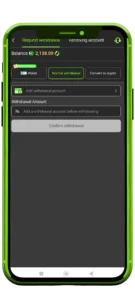
Y999 No Wallet Withdrawal Section

Select it to open the separate wallet interface.

Create a Six-Digit Payment PIN

The system may ask you to create a six-digit numeric PIN. This code is used to confirm payment-related activities.
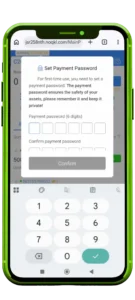
No Wallet Payment Pin

Choose a number that is difficult for others to guess. Never share your PIN with another person.

Complete Security Verification

Follow the instructions displayed on the screen. Complete the required security information to finish the registration.
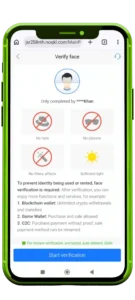
Y999 Game Withdrawal Failed Verification

Once the setup is complete, check whether the wallet dashboard is available.

Helpful tip: Always use your own account details. Avoid registering through another person's information because it may create problems during payment verification.

Y999 Game No Wallet Buying Guide

The buying option allows users to place an order for wallet balance through the available payment methods.

If you want to use this feature, follow the general process below.

Do not mark a payment as completed before sending the money. Also, keep your transaction receipt until the order is fully resolved.

Y999 Game Withdrawal Failed – How to Withdraw Through No Wallet

If the normal payment option is not working, you may check whether the No Wallet selling feature is available. This process involves placing an order and confirming the received payment.

Here is how the process is described.

Select the Sell Option

Open the wallet dashboard and tap the Sell button.

Enter Your Amount

Choose the amount you want to sell and select an available receiving method. Check the details before posting your order.

Post Your Sell Order

After reviewing the information, submit your request. Keep the application open if the platform requires you to monitor order updates.

Review the Buyer's Order

When a buyer places an order, open the Review section. Check the order information before accepting it.

Confirm the Sale

Review the buyer's details and confirm the sale only when everything appears correct.

Wait for Payment

Wait until the buyer sends the payment to your selected account. Do not release your balance simply because someone shares a payment screenshot or message.

Verify the Received Amount

Open your EasyPaisa or JazzCash account and check the actual transaction history. Confirm the amount and payer information. A screenshot alone is not proof that money has arrived.

Release the Funds

Only after confirming that the payment is genuinely available in your account should you consider selecting Release Funds. Enter your payment PIN if requested by the application.

Important: Never release funds before receiving and verifying the actual payment. If anything looks unusual, contact the platform's support team first.

No Wallet Exclusive Deposit Perks

The supplied promotion details describe special rewards for users who make qualifying deposits through No Wallet.

According to those details, the advertised reward starts at Rs. 20 for a Rs. 100 deposit and can reach Rs. 99,999 for a Rs. 3,000,000 deposit.

However, these figures are promotional claims, not guaranteed returns. Always check the current event page before making a payment.

Deposit Reward Participation Conditions

The listed conditions include:

How to Check Deposit Rewards

1. Complete an eligible deposit through No Wallet.
2. Open the promotion or event details page.
3. Check whether a reward is pending.
4. Refresh the page if the reward does not appear immediately.
5. Follow the displayed instructions to claim it.

The supplied rules state that rewards become available after 9:00 AM the following day.

They must be claimed manually through supported versions, including PC, Android H5, Android applications, and iOS applications.

Deposit Bonus Expiry and Turnover

According to the provided terms, rewards expire one day after the relevant event cycle ends if they are not claimed.

The promotional bonus also requires 1x valid turnover before withdrawal. The principal amount is excluded from this particular bonus requirement.

Read the complete event conditions before participating.

No Wallet Exclusive Withdrawal Perks

The supplied event information also describes rewards for qualifying withdrawals.

The advertised amount starts at Rs. 8 for a Rs. 100 withdrawal and may reach Rs. 99,999 for a Rs. 5,000,000 withdrawals.

These amounts depend on the platform's promotional rules and eligibility requirements. They should not be treated as guaranteed income.

Withdrawal Reward Conditions

The listed participation requirement states that the day's qualifying activity amount must be at least three times the deposit amount.

Other conditions include:

1. The cumulative daily withdrawal must meet the required event target.
2. Rewards are available only after a successful qualifying withdrawal.
3. Users can check the activity details or pending rewards page.
4. If a reward does not appear, refresh the page or check again later.
5. Eligible rewards can be claimed manually after the following day.
6. Unclaimed rewards expire one day after the relevant event period.
7. The promotional bonus requires 1x valid turnover before withdrawal.

Supported claiming options listed in the supplied information include PC, Android H5, iOS H5, Android applications, and iOS applications.

How to Fix Y999 Game Withdrawal Failed Problems

If you still experience payment difficulties, try these basic checks before submitting another request.

Check your transaction status

Open the transaction history and see whether your request is pending, rejected, or completed.

Verify your wallet information

Make sure the selected payment account belongs to you and that its details are correct.

Check your wallet balance

Look at your EasyPaisa or JazzCash transaction history to confirm whether the payment arrived.

Avoid repeated requests

Submitting several withdrawal orders can create confusion and make it harder to track your funds.

Contact customer support

If your payment remains pending, share the transaction ID, date, and relevant receipt with official support.

Keep payment records

Save transaction messages and receipts until the issue is completely resolved.

Important Terms and Conditions

The promotional rules include several restrictions that users should understand.

Always read the latest terms before depositing or withdrawing money.

Disclaimer

This article is for general information only. Gaming activities and money transactions involve financial risks. Rewards, payment methods, and withdrawal services may change. Only use money you can afford to lose, and verify all details through official platform channels before making a transaction.

Final Words

A Y999 Game Withdrawal Failed message can be frustrating, especially when you are waiting for a payment. Before making another request, check your transaction status, wallet details, and payment records.

The No Wallet feature is presented as an alternative way to manage buying and selling orders. However, it does not remove payment risks or guarantee that every transaction will be successful.

Use your own account, protect your payment PIN, verify every received amount, and contact official support whenever something seems wrong. Most importantly, never deposit money just to chase a promotional reward.

FAQ's

Can I use EasyPaisa and JazzCash with No Wallet?

The instructions mention both services as available payment methods for buying and selling orders. Actual availability may depend on the current application.

Is the No Wallet registration process free?

Check the registration screen and current platform terms for any applicable charges before proceeding.

How can I confirm that a withdrawal payment has arrived?

Open your receiving wallet and check its transaction history. Never rely only on a screenshot shared by another person.

Can I claim deposit and withdrawal rewards together?

Eligibility depends on the current promotional rules. Check the event details to understand which rewards can be claimed.

Scroll to Top